Best Laptop Under ₹20,000 in India (2026) – Top 10 Picks
✔ No fake reviews
✔ AI-ranked picks
✔ Prices updated today
🔥 Top 3 Picks (AI Ranked)
🏆 BEST PICK

FUTOPIA Ultimus Pentium Quad Core Laptop|S...
Expandable storage options (up to 1TB) provide flexibility not found in competitors like...
⭐ BESTPICKR TAKE
Expandable storage options (up to 1TB) provide flexibility not found in...
- ✅ Backpack carry feels lighter during daily movement.
- ✅ Switching between office, meetings, and travel feels easier.
- ⚠️ Heavier editing workloads can reduce battery faster.
Why this pick?
Why buyers pick this
- ✔ Moving between office, college, or travel feels easier.
Why not others
- Cheaper models usually cut corners on sustained speed or battery consistency
Ideal for: Mobility-first productivity, Cafe or transit usage
₹17,990
₹35,990
🔥 Save ₹18,000

🥈 Best Budget
Dynotrek Casual 15.6 Inch Laptop Casual
Better if basic office and study work matter more than premium specs.
₹699
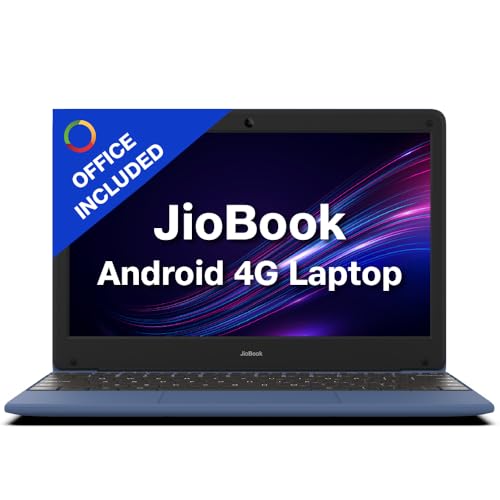
🥉 Best Performance
JioBook 11 with Lifetime Office |
Better for balanced daily use than heavy performance workloads.
₹10,990
Get price-drop alerts on WhatsApp
Selected deals, top picks and buying tips. No spam.
No spam • Selected updates only
Looking for the best laptops under ₹20,000 in India? This guide is tuned for buyers who care about usable day-to-day performance, reliable keyboards, and the least frustrating value in a very tight budget more than flashy spec sheets. We focus on picks that still look worth buying in 2026 by checking live Amazon pricing, review depth, and BestPickr AI scoring. That means fewer dead-end clicks, fewer overhyped options, and a faster shortlist built around real value in this budget.
🔥 Trending in this category
Get price-drop alerts on WhatsApp
Selected deals, top picks and buying tips. No spam.
No spam • Selected updates only

The honest answer first: ₹20,000 is a tight budget for a new laptop in 2026. The processor generations available, the RAM configurations, and the display quality at this price point involve real compromises. However, for specific use cases — primarily light document work, online classes, and basic browsing — a carefully chosen ₹20,000 laptop is genuinely adequate.
This guide sets honest expectations, tells you which compromises are acceptable and which are dealbreakers, and helps you decide whether ₹20,000 is enough for your needs or whether you should stretch to ₹25,000–₹30,000.
The Honest ₹20,000 Laptop Reality
What you get at ₹20,000:
- Intel Celeron N series or Pentium Silver / AMD E-series processors
- 4GB RAM (minimum — some offer 8GB)
- 256GB eMMC or SATA SSD storage
- 14–15.6 inch HD (1366×768) or FHD (1920×1080) display
- Windows 11 Home (on most models)
- USB-A ports, basic connectivity
What is compromised:
- Processing speed is noticeably slower than ₹30,000+ laptops
- 4GB RAM is insufficient for heavy multitasking in 2026
- eMMC storage (common at this price) is significantly slower than NVMe SSDs
- Build quality is entirely plastic — no metal anywhere
- Battery life is typically 4–6 hours real-world
Processor Reality at ₹20,000
The chips available at ₹20,000 are entry-level:
Intel Celeron N4500 / N4020: Dual-core processors from Intel's budget line. Adequate for Google Docs, simple spreadsheets, and YouTube. Struggles with multiple browser tabs and video calls simultaneously.
Intel Pentium Silver N6000: Slightly better than Celeron. Quad-core. Better for multitasking. Still far below Core i3 performance.
AMD Athlon Silver / Ryzen 3 (older gen): AMD's budget lineup at this price. Ryzen 3 offers meaningfully better performance than Intel Celeron at comparable prices — prioritise AMD if available.
The honest benchmark: A ₹20,000 laptop in 2026 has processing power comparable to a mid-range laptop from 2018–2019. For basic tasks, this is fine. For anything compute-intensive — video editing, data analysis, coding with multiple processes — it is genuinely frustrating.
Which Use Cases a ₹20,000 Laptop Handles Well
✅ Online classes and video calls (Zoom, Google Meet): Adequate — one application at a time
✅ Google Docs, Sheets, Slides: Fine for individual document work
✅ YouTube and OTT streaming: Acceptable at 1080p
✅ Email and basic web browsing: Fine with limited tabs (5–6 maximum)
✅ Light coding (Python basics, simple HTML/CSS): Adequate
❌ Engineering software (MATLAB, AutoCAD, SolidWorks): Completely inadequate
❌ Video editing: Not viable
❌ Having 15+ browser tabs open simultaneously: Frustrating
❌ Running VS Code + browser + Zoom simultaneously: Struggles
❌ Gaming above browser-based games: Inadequate
The 4GB RAM Problem
4GB RAM in 2026 Windows is a real constraint. Windows 11 itself uses approximately 2–2.5GB at idle. That leaves 1.5–2GB for your applications. One browser tab uses approximately 100–200MB; video calls use 400–600MB; a document editor uses 200–400MB.
With 4GB RAM, you will experience:
- Frequent application pauses while memory is reallocated
- Slow browser tab switching
- Audio/video quality drops during calls while something else is running
Recommendation: If buying at ₹20,000, prioritise models offering 8GB RAM even if it means less storage or a slightly slower processor. 8GB RAM transforms the experience.
Should You Stretch to ₹25,000–₹30,000?
If your budget has any flexibility: yes. The ₹25,000–₹28,000 range opens access to Intel Core i3-12th Gen or AMD Ryzen 3 7000 series chips with 8GB RAM — a transformation in daily performance. The difference is not marginal; it is the difference between "just adequate" and "comfortable."
Stretching ₹5,000–₹8,000 at laptop purchase is one of the highest-value adjustments in Indian consumer electronics.
Best Options at ₹20,000
ASUS VivoBook Go 14: One of the better-performing options at this price. AMD Ryzen 3 variant when available, decent display for the price.
Lenovo IdeaPad 1: Reliable build for the price, adequate for basic use, good keyboard for a budget laptop.
HP 14s: Consistent quality control, acceptable display, reasonable battery life.
Acer Aspire series (entry): Budget-friendly with Intel Celeron options. Acceptable for very light use.
🔍 Which budget laptop gets the best AI score from Indian students and home users? bestpickr.in ranks every laptop using real Indian buyer feedback — performance, battery, build, and value all scored. 👉 See laptop rankings under ₹20,000 → bestpickr.in/category/laptops
FAQ
Q: Can I do engineering college assignments on a ₹20,000 laptop? For first-year basic assignments (programming basics, simple calculations): yes with patience. For anything using AutoCAD, MATLAB, or simulation software: no.
Q: Is a Chromebook better than a Windows laptop at ₹20,000? For students primarily using Google Workspace and streaming: Chromebook is faster and more reliable at this price. For Windows software requirements: Windows is necessary.
Q: Should I buy a used/refurbished laptop instead? A refurbished Core i5-10th Gen laptop at ₹18,000–₹22,000 significantly outperforms a new Celeron at ₹18,000. From a reputable refurbisher with warranty: often the better choice.
💡 Set realistic expectations before buying a ₹20,000 laptop. The AI score tells you if it's genuinely adequate for your needs. 👉 Compare laptops → bestpickr.in
Conclusion
A ₹20,000 laptop is adequate for online classes, light document work, and basic browsing — nothing more. Prioritise 8GB RAM over every other specification. Choose AMD over Intel at this price for better performance per rupee. If your budget can stretch to ₹28,000, do it — the Core i3/Ryzen 3 difference is transformational. For heavier academic or professional needs, ₹20,000 will frustrate you within months.
People also search
Who should buy this
- Students and first-time buyers who need basic study, browsing, and document work.
- Families looking for a backup laptop without overspending.
- Buyers who care more about practical day-to-day usability than premium design.
Who should avoid this
- Anyone expecting strong gaming, editing, or heavy multitasking performance.
- Buyers who need a laptop to last many years under serious daily load.
Why trust BestPickr
- We compare Amazon pricing signals with product-level AI analysis instead of leaning on star ratings alone.
- Picks are filtered for current stock, usable review depth, and practical value for Indian buyers.
- The shortlist is refreshed from live marketplace data so outdated or inflated options drop away faster.
How we ranked
- We prioritized usable day-to-day performance, reliable keyboards, and the least frustrating value in a very tight budget because that is what usually separates strong buys from forgettable ones in this budget.
- AI score, review confidence, and live price competitiveness all influence which products surface near the top.
- When two options are close, we favor the one with cleaner buyer feedback and stronger long-term value for money.
Explore related guides
Frequently Asked Questions
Which is the best laptop under ₹20,000 in India?▾
The best laptop under ₹20,000 depends on your balance of performance, reliability, and price. BestPickr compares AI score, review quality, and live pricing so you can shortlist the strongest options quickly.
What matters most before buying laptops under ₹20,000?▾
Start with the signals that affect daily ownership: usable day-to-day performance, reliable keyboards, and the least frustrating value in a very tight budget. Then check current price, stock status, and whether reviews are deep enough to trust.
Are laptops under ₹20,000 still worth buying in 2026?▾
Yes, if you focus on models that still look competitive at current prices. We filter for in-stock picks with enough useful review and scoring support instead of surfacing discount-heavy placeholders.
How does BestPickr rank laptops under ₹20,000?▾
We combine Amazon pricing signals, AI-backed product analysis, and review quality checks to highlight products that make practical buying sense for Indian shoppers today.


 Reddit