Best Laptop Under ₹30,000 in India (2026) – Top 10 Picks
✔ No fake reviews
✔ AI-ranked picks
✔ Prices updated today
🔥 Top 3 Picks (AI Ranked)
🏆 BEST PICK

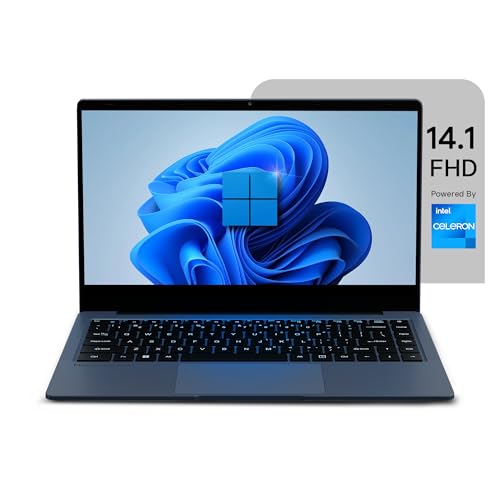
Neopticon BrowseBook 14.1" FHD IPS Laptop
Lightweight design at 1.3kg, making it easier to carry than competitors like the...
⭐ BESTPICKR TAKE
Lightweight design at 1.3kg, making it easier to carry than competitors like...
- ✅ Backpack carry feels lighter during daily movement.
- ✅ Switching between office, meetings, and travel feels easier.
- ⚠️ Heavier editing workloads can reduce battery faster.
Why this pick?
Why buyers pick this
- ✔ Moving between office, college, or travel feels easier.
Why not others
- Performance-heavy laptops feel faster but are less travel-friendly daily
Ideal for: Daily commute, On-the-go productivity
₹20,990
₹30,000
🔥 Save ₹9,010
🥈 Best Budget
Neopticon BrowseBook 14.1" FHD IPS Laptop
Better value if upfront price matters most.
₹21,990

🥉 Best Performance
AVITA Cosmos 2 in 1 Intel
Better if faster cooling matters more than lowest price.
₹23,990
Get price-drop alerts on WhatsApp
Selected deals, top picks and buying tips. No spam.
No spam • Selected updates only
🔥 Trending in this category
Get price-drop alerts on WhatsApp
Selected deals, top picks and buying tips. No spam.
No spam • Selected updates only

Most Indian laptop buying guides focus on under ₹40,000 (student market) or under ₹20,000 (extreme budget). The ₹25,000–₹30,000 range is consistently overlooked — and it is arguably where the best price-to-performance ratio in Indian laptops currently lives.
At ₹30,000, you step above the tier where brands cut corners on RAM, SSD capacity, and display quality. This guide explains exactly what you can expect and how to choose well.
What ₹30,000 Gets You in 2026
This budget unlocks configurations that are meaningfully better than the ₹20,000–₹25,000 range:
- AMD Ryzen 5 or Intel Core i5 (12th/13th Gen) processors
- 8GB RAM — with some models offering 16GB
- 512GB NVMe SSD (significantly faster than SATA SSDs common in lower budgets)
- 1080p FHD IPS display with anti-glare coating
- 6–8 hour real-world battery life
- Metal chassis or reinforced polycarbonate with decent build quality
- USB-C charging support on most models
What remains unavailable or compromised at this price:
- Dedicated GPU for gaming or video editing (discrete GPU pushes to ₹45,000+)
- OLED or high-refresh display
- Thunderbolt 4 connectivity
Processor Matchup: AMD Ryzen 5 vs Intel Core i5
This is the central decision at this price point.
AMD Ryzen 5 7530U / 7535U: 6-core processor with strong multi-threaded performance. Excellent battery efficiency — consistently outperforms Intel equivalents in battery life by 1–2 hours in real-world use. Better for everyday multitasking, light coding, and sustained workloads.
Intel Core i5-12th Gen / 13th Gen: Single-core performance advantage over Ryzen 5 in this generation. Better for applications that do not run across multiple cores efficiently. Thunderbolt 4 support on some models.
For most Indian buyers at ₹30,000: AMD Ryzen 5 7530U or newer offers the best combination of performance and battery life. The multi-hour battery advantage on AMD makes a real difference for working outside of office setups or studying without a charger.
RAM Configuration — When 8GB Becomes a Limitation
At ₹30,000, most laptops ship with 8GB RAM. For most users — document editing, spreadsheets, web browsing, video calls — 8GB is sufficient in 2026.
The scenario where 8GB becomes a constraint:
- Running Docker containers or virtual machines
- Keeping 20+ Chrome tabs open simultaneously
- Running Zoom + document editing + email client simultaneously
- Data science work with large datasets
If any of the above describes your workflow, look for a model with 16GB RAM or one where the RAM is upgradeable. Some manufacturers solder RAM at this price point — verify before purchasing.
How to check: Search the exact model's disassembly guide or service manual. "Soldered RAM" = not upgradeable. "SO-DIMM slot" = upgradeable.
Storage — NVMe vs SATA SSD Matters
At ₹30,000, most laptops include an NVMe SSD (M.2 PCIe). This is significantly faster than the SATA SSDs common in cheaper laptops.
Read speeds comparison:
- SATA SSD: ~500 MB/s
- NVMe PCIe Gen 3: ~2,000–3,500 MB/s
- NVMe PCIe Gen 4: ~5,000 MB/s+
For daily use, the practical difference between NVMe Gen 3 and Gen 4 is minimal — both feel fast. The difference between SATA and NVMe is very noticeable for large file operations, software loading, and boot times.
Confirm the storage type in the specification sheet. Some brands hide SATA SSDs in otherwise well-specced ₹28,000 laptops to hit price targets.
Display Quality — The Non-Negotiable Upgrade
Between ₹20,000 and ₹30,000, display quality makes the most visible difference. Budget laptops under ₹22,000 often use TN or low-quality IPS panels with poor brightness and colour accuracy.
At ₹28,000–₹30,000, look for:
- IPS-level panel with at least 250 nits brightness (300 nits preferred for Indian bright-room conditions)
- Anti-glare coating — matte display reduces reflections from Indian tubelight setups
- 72% NTSC or 45% NTSC sRGB colour gamut — 45% NTSC is acceptable for general use; 72% NTSC is better for anyone doing photo editing
What to avoid: "HD Ready" (1366×768) screens on 15.6-inch laptops. At 15 inches, 720p looks visibly pixelated for text-heavy work. 1080p FHD is non-negotiable at this price.
Battery Life — Real-World Expectations
Manufacturer battery claims are tested under ideal conditions (screen brightness 30%, no active applications, Wi-Fi off). Real-world Indian usage patterns produce different results.
Realistic battery life at this price range by processor:
- AMD Ryzen 5 (45W TDP or lower): 7–9 hours real-world mixed use
- Intel Core i5-12th/13th Gen (15W TDP): 5–7 hours real-world
If you work in places without reliable power access — cafes, trains, client sites — the AMD advantage here is significant over a full workday.
Charging speed: Most laptops in this range support USB-C charging at 45W–65W. This matters because you can use a compatible phone charger or power bank for emergency charging. Verify whether the laptop charges via USB-C or proprietary barrel connector before buying.
Build Quality at ₹30,000
The jump from ₹22,000 to ₹30,000 often brings a meaningful build quality improvement.
What improves:
- Chassis rigidity — lid flex and keyboard deck flex reduce
- Hinge quality — hinges that feel loose after 12 months indicate poor engineering
- Keyboard travel and feel — budget laptops frequently have shallow, mushy keys
- Trackpad precision and palm rejection
What typically does not improve until ₹45,000+:
- Full metal chassis (magnesium alloy or aluminium throughout)
- Military-grade drop testing
- Fingerprint resistance (many laptops in this range still show fingerprints prominently)
Keyboard quality matters more than most buyers realise. You type on this laptop every day. A laptop with poor key travel and mushy feedback causes genuine fatigue over long sessions. Read Indian reviews specifically mentioning typing feel before committing.
Who This Budget Is Right For
₹30,000 is the ideal budget for:
- Salaried professionals working from home or hybrid — adequate for all office applications and video calls
- Freelancers in writing, design (basic), digital marketing, and content creation
- College students in non-engineering disciplines who want reliable 4-year performance
- Parents buying a family laptop for general home use, online learning, and OTT streaming
It is not the right budget for:
- Engineering students requiring MATLAB, SolidWorks, or heavy simulation software (needs ₹40,000+)
- Video editors or graphic designers (needs dedicated GPU at ₹50,000+)
- Competitive gamers (needs dedicated GPU)
🔍 Which laptop under ₹30,000 gets the best AI score from Indian buyers in 2026? bestpickr.in ranks every laptop using AI scores built from real Indian reviewer signals — performance, battery, build, and display all scored separately. 👉 See laptop rankings → bestpickr.in/category/laptops
FAQ
Q: Is ₹30,000 enough for a good laptop in India in 2026? Yes, for most everyday use cases. ₹30,000 buys a capable Ryzen 5 or i5 laptop with 512GB NVMe SSD and 8GB RAM that handles office work, online learning, and casual multimedia without compromise.
Q: Should I buy AMD or Intel at ₹30,000? For battery life and everyday multitasking: AMD Ryzen 5 (7530U or newer). For single-core speed and specific professional software: Intel Core i5-12th Gen. For most buyers, AMD is the better choice at this price.
Q: Is 8GB RAM enough for a ₹30,000 laptop? For general use, yes. For multitasking-heavy workflows, consider paying slightly more for 16GB or buying a model where RAM is user-upgradeable.
Q: Which brand makes the best laptop under ₹30,000 in India? Lenovo IdeaPad, ASUS VivoBook, HP Pavilion, and Acer Aspire all have strong options in this range. Evaluate specific models on their spec sheets and Indian user reviews — the brand matters less than the specific model's configuration.
Q: Can a ₹30,000 laptop last 5 years? Yes, with a quality SSD and processor from the current generation. The battery will degrade by year 3–4 but the hardware performance remains adequate for office use throughout.
💡 Check which ₹30,000 laptop Indian professionals actually recommend after 6 months of daily use. bestpickr™ weights long-term Indian reviewer signals — keyboard quality, battery degradation, software stability — to build honest AI scores. 👉 Find your laptop → bestpickr.in
Conclusion
The ₹28,000–₹30,000 laptop segment is the best value bracket in India in 2026. AMD Ryzen 5 processors, 512GB NVMe SSDs, 8GB RAM, and FHD IPS displays are all accessible here. The most impactful upgrade from the lower bracket is display quality and battery life — both of which affect your daily experience more than processor benchmarks. Prioritise a model with a good IPS panel, at least 7 hours of real-world battery life, and a keyboard that feels good under 30 minutes of sustained typing. The specs are increasingly homogenous at this price; the details are what differentiate good choices from regrettable ones.


 Reddit