Best Monitors Work From Home Under ₹20,000 in India (2026) – Top Picks Compared
✔ No fake reviews
✔ Carefully ranked picks
✔ Prices updated today
🔥 Top 3 Picks (AI Ranked)
🏆 BEST PICK

LG 27G610A 68.4 cm Ultragear QHD
Balanced tablet for study, streaming and daily use.
🔥 Save ₹16,501
₹18,499
Save ₹16,501
🏆 BEST PICK

LG 27G610A 68.4 cm Ultragear QHD
FPS Gaming Pick
BestPickr Monitor Verdict
FPS Gaming PickFPS players who want fast movement to look cleaner.
⚠ Only worth it if your PC can actually push high frame rates.
Good for
Avoid if
BestPickr Take
- ✓ Gameplay blur becomes less distracting once frame rates
- ✓ Sharper daily productivity visibility
Price Insight
Based on available tracked history.
Typical price: ₹18,499 - ₹18,499
🕒 Tracking price movement
Price verified recently · Based on available tracked history
₹18,499
₹35,000
🔥 Save ₹16,501
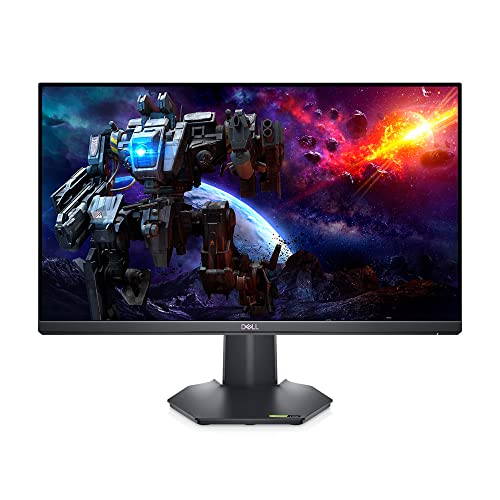
🥈 Best Budget
Dell-G2422HS- 24" FHD Gaming Monitor, 165Hz,
Better value if upfront price matters most.
₹15,115

🥉 Best Performance
LG 32GS60QC 80cm Ultragear Curved QHD
Better if stronger performance matters more than lowest price.
₹19,599
Get price-drop alerts on WhatsApp
Selected deals, top picks and buying tips. No spam.
No spam • Selected updates only
Looking for the best work from home monitors under ₹20,000 in India? This guide is tuned for buyers who care about panel quality, eye comfort, and desk-friendly productivity value more than flashy spec sheets. We focus on picks that still look worth buying in 2026 by checking live Amazon pricing, review depth, and BestPickr AI scoring. That means fewer dead-end clicks, fewer overhyped options, and a faster shortlist built around real value in this budget.
🔥 Trending in this category
Get price-drop alerts on WhatsApp
Selected deals, top picks and buying tips. No spam.
No spam • Selected updates only

If you work from home and use a laptop screen all day, you are shortchanging your productivity and your eyes. A good external monitor increases screen real estate, reduces eye strain, and improves posture by raising your eye level.
Under ₹20,000 in India in 2026, you can get an excellent monitor. The decisions come down to a few key parameters — and this guide explains each one plainly.
Size: 24-inch vs 27-inch
For a desk distance of 50–70cm (typical home office), a 24-inch monitor at 1080p is the sweet spot. Pixel density is ideal — text is sharp, the entire screen is visible without moving your head.
A 27-inch monitor at 1080p is too pixel-sparse — text looks soft. For 27 inches, you need 1440p (QHD) resolution, which pushes the budget higher.
Recommendation at this budget: 24-inch 1080p IPS. If you can stretch to ₹24,000–₹28,000, a 27-inch 1440p monitor is a meaningful upgrade.
Panel Types Explained
IPS (In-Plane Switching): Best colour accuracy and viewing angles. Accurate colours from any angle. Ideal for design work, document editing, and video calls. The right choice for WFH.
VA (Vertical Alignment): Higher contrast ratio than IPS (better blacks). Slight colour shift at extreme angles. Good for video consumption. Adequate for general WFH use.
TN (Twisted Nematic): Fast response time but poor colours and viewing angles. Only relevant for competitive gaming. Avoid for WFH.
Refresh Rate for WFH — 60Hz or 75Hz Is Enough
Unlike gaming, work applications do not require high refresh rates. A 60Hz or 75Hz monitor is completely adequate for:
- Document editing
- Spreadsheets
- Video calls
- Web browsing
- Coding
If you also game occasionally: 144Hz becomes relevant. Several IPS monitors at ₹18,000–₹20,000 offer 144Hz in 2026, making them excellent dual-purpose choices.
Eye Care Features — Critical for All-Day Use
This is the most underrated feature category for WFH monitors. You will spend 6–10 hours looking at this screen every day.
Flicker-Free: Traditional monitors flicker at low brightness to dim the backlight. Flicker-free monitors use DC dimming, which eliminates the flicker your eyes perceive subconsciously. Reduces headaches and eye fatigue significantly.
Low Blue Light: Blue light wavelengths suppress melatonin and cause eye strain. Most monitors now include a hardware-level blue light reduction mode (separate from the software Night Mode on Windows).
Anti-Glare Coating: Essential in Indian rooms where tubelight placement is not always ideal. Matte anti-glare screens reduce reflections from overhead lights.
Height-Adjustable Stand: Often overlooked. Being able to raise or lower the monitor height by 10–15cm allows proper posture — screen at or slightly below eye level. Saves you from neck pain within 3 months of extended use.
🔍 Which WFH monitor do Indian buyers actually recommend? bestpickr.in scores every monitor under ₹20,000 using AI — so you know exactly which ones deliver on their promises. 👉 See monitor rankings → bestpickr.in/category/monitors/under-20000
Connectivity — What Ports Do You Need?
At minimum:
- 1× HDMI — to connect laptop or desktop
- 1× DisplayPort — faster signal, better for higher refresh rates
- USB hub (nice to have) — some monitors include 2–3 USB ports, turning the monitor into a hub for your keyboard, mouse, and pen drive
If you use a laptop, check whether it outputs via HDMI or USB-C. Some thin laptops only have USB-C output, requiring a USB-C to HDMI adapter or a monitor with USB-C input.
Brands Worth Considering in India
- LG UltraGear / UltraWide — Industry-leading IPS quality. Best colour accuracy at this price.
- Dell — Professional-grade panel quality, excellent ergonomics, wide service network.
- Samsung — Good colour performance, strong build quality.
- AOC — Excellent value, less premium feel but solid specifications.
- ViewSonic — Underrated in India. Consistent eye-care feature set.
- BenQ — Known for colour-accurate panels. Good for design work.
A Note on UltraWide Monitors
21:9 ultrawide monitors (e.g., 34-inch) are productive but mostly fall above ₹20,000. If you multitask heavily (keeping 3 windows side by side), a ultrawide is worth saving for.
💡 Your eyes spend 8 hours a day on this screen. Choose wisely. bestpickr™ analyses real buyer reviews to score monitors on display quality, build, and eye-care performance — no guesswork. 👉 Find your monitor → bestpickr.in
FAQ
Q: Should I get a 1080p or 1440p monitor for WFH? At 24 inches, 1080p is perfectly sharp. At 27 inches, 1440p is necessary for crisp text. Budget accordingly.
Q: Is IPS better than VA for office work? Yes, for office use. IPS panels have better colour accuracy and consistent viewing angles — important when colleagues look at your screen during video calls.
Q: Does monitor size affect productivity? Yes, measurably. Studies consistently show larger screen real estate reduces time spent switching between windows. Upgrading from a 15-inch laptop screen to a 24-inch monitor is a meaningful productivity gain.
Q: Can I use a gaming monitor for work? Absolutely. A 144Hz IPS gaming monitor is excellent for work — the high refresh rate makes scrolling smoother, and IPS panels have good colour accuracy.
Q: Is a curved monitor good for WFH? Curved monitors are primarily a gaming/immersive-viewing feature. For spreadsheets and documents, a flat monitor is equally good and typically cheaper.
Conclusion
For WFH under ₹20,000 in India: buy a 24-inch 1080p IPS panel from LG, Dell, or BenQ, with flicker-free and low blue light certifications. Ergonomics matter — prioritise a height-adjustable stand. If you also game, a 144Hz IPS monitor at this price is the best of both worlds. Your eyes will thank you within the first week.
Who should buy this
- Remote workers upgrading from a laptop-only setup.
- Buyers balancing productivity, eye comfort, and price in a home office.
Who should avoid this
- Shoppers mainly looking for esports gaming monitors.
- Users who need a premium color-critical display for professional creative work.
Why trust BestPickr
- We compare Amazon pricing signals with product-level AI analysis instead of leaning on star ratings alone.
- Picks are filtered for current stock, usable review depth, and practical value for Indian buyers.
- The shortlist is refreshed from live marketplace data so outdated or inflated options drop away faster.
How we ranked
- We prioritized panel quality, eye comfort, and desk-friendly productivity value because that is what usually separates strong buys from forgettable ones in this budget.
- AI score, review confidence, and live price competitiveness all influence which products surface near the top.
- When two options are close, we favor the one with cleaner buyer feedback and stronger long-term value for money.
Explore related guides
Frequently Asked Questions
Which is the best monitor under ₹20,000 in India?▾
The best monitor under ₹20,000 depends on your balance of performance, reliability, and price. BestPickr compares AI score, review quality, and live pricing so you can shortlist the strongest options quickly.
What matters most before buying work from home monitors under ₹20,000?▾
Start with the signals that affect daily ownership: panel quality, eye comfort, and desk-friendly productivity value. Then check current price, stock status, and whether reviews are deep enough to trust.
Are work from home monitors under ₹20,000 still worth buying in 2026?▾
Yes, if you focus on models that still look competitive at current prices. We filter for in-stock picks with enough useful review and scoring support instead of surfacing discount-heavy placeholders.
How does BestPickr rank work from home monitors under ₹20,000?▾
We combine Amazon pricing signals, AI-backed product analysis, and review quality checks to highlight products that make practical buying sense for Indian shoppers today.


 Reddit