Laptop vs Tablet vs iPad: Which Should an Indian Student or Professional Buy in 2026?
✔ No fake reviews
✔ Carefully ranked picks
✔ Prices updated today
🔥 Top 3 Picks (AI Ranked)
🏆 BEST PICK

Dynotrek Casual 15.6 Inch
Balanced tablet for study, streaming and daily use.
🔥 Save ₹650
₹699
Save ₹650
🏆 BEST PICK

Dynotrek Casual 15.6 Inch
Best for Home Use
BestPickr Laptop Verdict
Best for Home UseBrowsing, streaming, bills, and light work stay simple.
⚠ Not built for heavy apps, gaming, or long-term power use.
Good for
Avoid if
BestPickr Take
- ✓ Covers normal family tasks without overcomplicating the purchase
- ✓ Stronger office multitasking than nearby alternatives
Price Insight
Based on available tracked history.
Typical price: ₹699 - ₹699
🕒 Tracking price movement
Price verified recently · Based on available tracked history
₹699
₹1,349
🔥 Save ₹650

🥈 Best Budget
eStand Lap Board
Covers normal family tasks without overcomplicating the purchase.
₹579
🥉 Best Performance
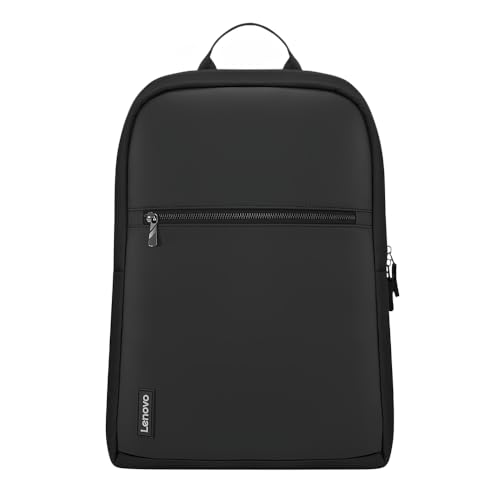
Lenovo 16-inch Value Lite
Lightweight enough for regular college or office carry.
₹699
Get price-drop alerts on WhatsApp
Selected deals, top picks and buying tips. No spam.
No spam • Selected updates only
🔥 Trending in this category
Get price-drop alerts on WhatsApp
Selected deals, top picks and buying tips. No spam.
No spam • Selected updates only

In 2026, the line between laptop and tablet has genuinely blurred. iPads run desktop-class software. Android tablets have keyboard accessories that make them laptop-adjacent. Laptops are thinner and lighter than ever. So which one should you buy?
The answer depends entirely on what you do — and this guide maps specific use cases to specific device types with clear reasoning.
The Three Categories Defined
Laptop (Windows / MacBook): Full desktop operating system, traditional keyboard, trackpad, runs all professional software. The most capable option for complex work.
Android Tablet (Samsung Galaxy Tab, OnePlus Pad, Lenovo Tab): Touchscreen-first, optional keyboard accessories, Android OS. Middle ground between phone and laptop. Best for consumption and light productivity.
iPad (Apple): Touchscreen + Apple Pencil + optional keyboard. iPadOS is more capable than Android but less capable than Windows/macOS. Best-in-class build quality and performance.
Use Case Mapping — Who Should Buy What
For College Students (Engineering / CS / Data Science)
Buy: Laptop
No contest. Engineering software — MATLAB, AutoCAD, SolidWorks, VS Code with Docker, Jupyter notebooks — requires a full desktop OS. Android tablets and even iPads cannot run this software. The iPad Pro with Magic Keyboard is the closest alternative, but software compatibility in Indian engineering curricula makes Windows/macOS essential.
Budget guidance: ₹35,000–₹50,000 for a capable AMD Ryzen 5 or Intel i5 laptop with 16GB RAM.
For Arts / Commerce / MBA Students
Buy: Consider a tablet + keyboard OR a budget laptop
If your work is primarily documents, spreadsheets, presentations, research, and note-taking — a good Android tablet with a keyboard cover (Samsung Galaxy Tab A8 or OnePlus Pad Go + keyboard) handles all of it.
The advantage of a tablet for arts students: lighter to carry, longer battery, touchscreen for annotating PDFs and research papers with a stylus.
The limitation: Cannot run desktop-specific software if your course requires it. Verify your curriculum's software requirements before choosing tablet over laptop.
For Professionals (Office / WFH / Corporate)
Buy: Laptop (unless your employer provides one)
Corporate software (SAP, Salesforce, complex Excel with macros, VPN clients, legacy enterprise tools) runs on Windows only. If your employer provides a laptop, you may only need a secondary device for personal use — a tablet works there.
For professionals who travel frequently and want a light secondary device for reading, video calls, and casual work: an iPad Air or Samsung Galaxy Tab S-series offers excellent portability.
For Creative Professionals (Designers / Illustrators / Video Editors)
Buy: iPad Pro (if primarily illustration) or MacBook (if video editing)
The iPad Pro with Apple Pencil is the gold standard for digital illustration in 2026. Procreate runs exclusively on iPad. The pressure sensitivity, latency, and display quality of the iPad Pro + Apple Pencil combination is unmatched in any other form factor.
For video editing: Final Cut Pro on MacBook or Adobe Premiere Pro on Windows laptop. Neither runs natively on an Android tablet, and iPad versions are capable for basic editing but limited for professional workflows.
For Casual Home Users (Netflix, YouTube, Reading, Light Browsing)
Buy: Android Tablet
A Samsung Galaxy Tab A7 Lite or Redmi Pad SE at ₹12,000–₹18,000 handles all of this perfectly. It is lighter than a laptop, easier to use on a sofa or in bed, has a better display-to-size ratio, and battery life is superior.
If you already have a smartphone that handles all your light tasks: consider whether you actually need a tablet at all. Many people find the tablet becomes redundant alongside a smartphone and laptop.
Operating System Comparison for Indian Users
| Feature | Windows Laptop | Android Tablet | iPad (iPadOS) |
|---|---|---|---|
| Software compatibility | ★★★★★ | ★★★ | ★★★★ |
| Gaming (mobile titles) | ★★★ | ★★★★★ | ★★★★ |
| MS Office | Full desktop | Mobile version | Near-desktop |
| OTT apps (Netflix, Hotstar) | Browser | Native app | Native app |
| Multitasking | ★★★★★ | ★★★ | ★★★★ |
| Stylus / pen input | Limited | Good | Excellent |
| Repairability in India | ★★★★★ | ★★★★ | ★★ |
| Long-term software support | ★★★★ | ★★★ | ★★★★★ |
Price Reality in India — 2026
| Device | Entry Price | Mid-Range | Premium |
|---|---|---|---|
| Android Tablet | ₹10,000 | ₹20,000–₹35,000 | ₹50,000+ |
| iPad (standard) | ₹34,900 | ₹59,900 (Air) | ₹1,09,900 (Pro) |
| Windows Laptop | ₹25,000 | ₹40,000–₹60,000 | ₹80,000+ |
| MacBook | ₹94,900 (Air M2) | ₹1,19,900 (Air M3) | ₹1,59,900+ |
Key observation: A mid-range Android tablet + keyboard cover at ₹25,000–₹35,000 directly competes with a budget Windows laptop at the same price. For that specific budget, the use case must determine the choice — they are not interchangeable.
🔍 Looking for the best laptop or tablet in your budget? bestpickr.in ranks laptops by AI score built from real Indian student and professional reviews — not just spec sheet comparisons. 👉 See laptop rankings → bestpickr.in/category/laptops
The Keyboard Question for Tablets
A tablet without a keyboard is a consumption device. A tablet with a keyboard is a productivity device — but with limitations.
What a tablet keyboard does well:
- Typing documents, emails, messages
- Attending video calls with a stand
- Light spreadsheet work
What it does not replace in a laptop:
- Trackpad precision for complex work (most tablet keyboards have small, imprecise trackpads or none)
- Physical stability on a lap (tablets on keyboard covers are less stable than a laptop hinge)
- Full keyboard shortcuts and function key compatibility in desktop software
If you buy a tablet for productivity, budget ₹3,000–₹8,000 extra for a quality keyboard cover. The built-in stands on Samsung's DeX-compatible covers are excellent.
Long-Term Value: Software Updates and Resale
iPad: Apple provides the longest software support lifecycle — 6–7 years of iPadOS updates. An iPad bought in 2026 will receive updates until 2032. Resale value in India is also the strongest of the three categories.
Windows Laptop: Microsoft Windows 11 support extends to 2025–2028 for current hardware. Most Indian laptop brands provide 2–3 years of driver support. Repairability is the best of all three options.
Android Tablet: Variable. Samsung flagships receive 4 years of OS updates. Budget Android tablets may receive 2 years or less. Resale value is weak.
FAQ
Q: Can an iPad replace a laptop for Indian college students? For arts, commerce, and general courses: largely yes, with a keyboard. For engineering, CS, data science, or any course requiring Windows-specific software: no.
Q: Is a Samsung Galaxy Tab better than an iPad for Android users? Ecosystem-wise: yes, if you use Android phones and Google services. The Samsung DeX mode (desktop-like interface) is impressive. But iPadOS remains more polished for productivity and has better app quality for creative work.
Q: Can I do online classes on a tablet? Yes. Google Meet, Zoom, Microsoft Teams all have excellent Android and iPad apps. Screen sharing of documents works well. The larger screen compared to a phone makes online classes more comfortable.
Q: Is a ₹15,000 Android tablet worth buying? For consumption (Netflix, YouTube, reading): yes. For productivity or study: a ₹30,000 laptop delivers more value at that budget step.
Q: Do Indian banking and payment apps work on tablets? Most do, but some Indian banking apps detect tablet screens and disable features. BHIM UPI and PhonePe work fully on tablets. Some bank-specific apps (HDFC MobileBanking, for example) have limited tablet interfaces.
💡 Before spending ₹40,000+ on any device, check what real Indian buyers said. bestpickr™ ranks laptops and tablets by AI score — built from Indian reviewer signals and long-term buyer feedback. No paid rankings. No sponsored bias. 👉 Find your device → bestpickr.in
Conclusion
The laptop wins whenever professional software, complex multitasking, or physical keyboard-dependent work is involved — which covers most Indian students and professionals. The iPad wins for creative professionals, long-term software support, and the Apple Pencil use case. Android tablets win for casual home use, lightweight portability, and budget consumption needs. Never buy a tablet hoping it will replace a laptop unless you have verified your software requirements can be met by iPadOS or Android specifically. Use case first, device second.

 Reddit